Building My Own PC for Local AI

Antony Budianto
On this page
Hi, this time it's not about web or 3D. I finally built my own PC for running AI models locally, so here's how it went: why I wanted one, the parts, the software, the numbers, and how I actually use it.
The short version: it works better than I expected, the model I use most is not the biggest one I can fit, and the two reasons I keep coming back to it are privacy and having something that still works when the cloud doesn't.
Why local
I'm not trying to replace hosted models, and the frontier ones are still better at the hard stuff. Two things make a machine in my own room worth it anyway.
Privacy
Running locally improves my privacy concern when using cloud models. The weights are on my disk, the prompt never leaves the machine, and the tool calls happen against my own filesystem and my own network. There's no third party to trust, log, retain, or get breached, because there's no third party. Also, it can work offline too.
A fallback when the cloud isn't there
Cloud models go down, and they always seem to pick a moment when I'm in the middle of something. They can also just stop being worth the price to me: plans change, free tiers shrink. Either way, I don't love that my only path to a working model would run through someone else's billing page. That's a single point of failure sitting in the middle of how I work.
Swapping the model, keeping the harness
Here's how that plays out in practice, which I think is the most useful thing in this post.
I subscribe to Claude for coding and reach for it first. When it's down I don't stop working and I don't change tools: I point Claude Code or Hermes at my local Qwen instead, and carry on.
That works because the harness and the model are separate pieces. The harness is the part that actually shapes my day — it holds the context, runs the tools, edits the files, keeps the loop going — and the model behind it is a component I can swap. Setting it up that way turns an outage into a downgrade in quality rather than a full stop. If my workflow only lived inside one vendor's app, I'd be inheriting that vendor's uptime and that vendor's pricing along with it.
The honest part: local Qwen is not Claude, and I notice the difference on hard problems immediately. But "noticeably worse and still working" beats "blocked", every time.
The build
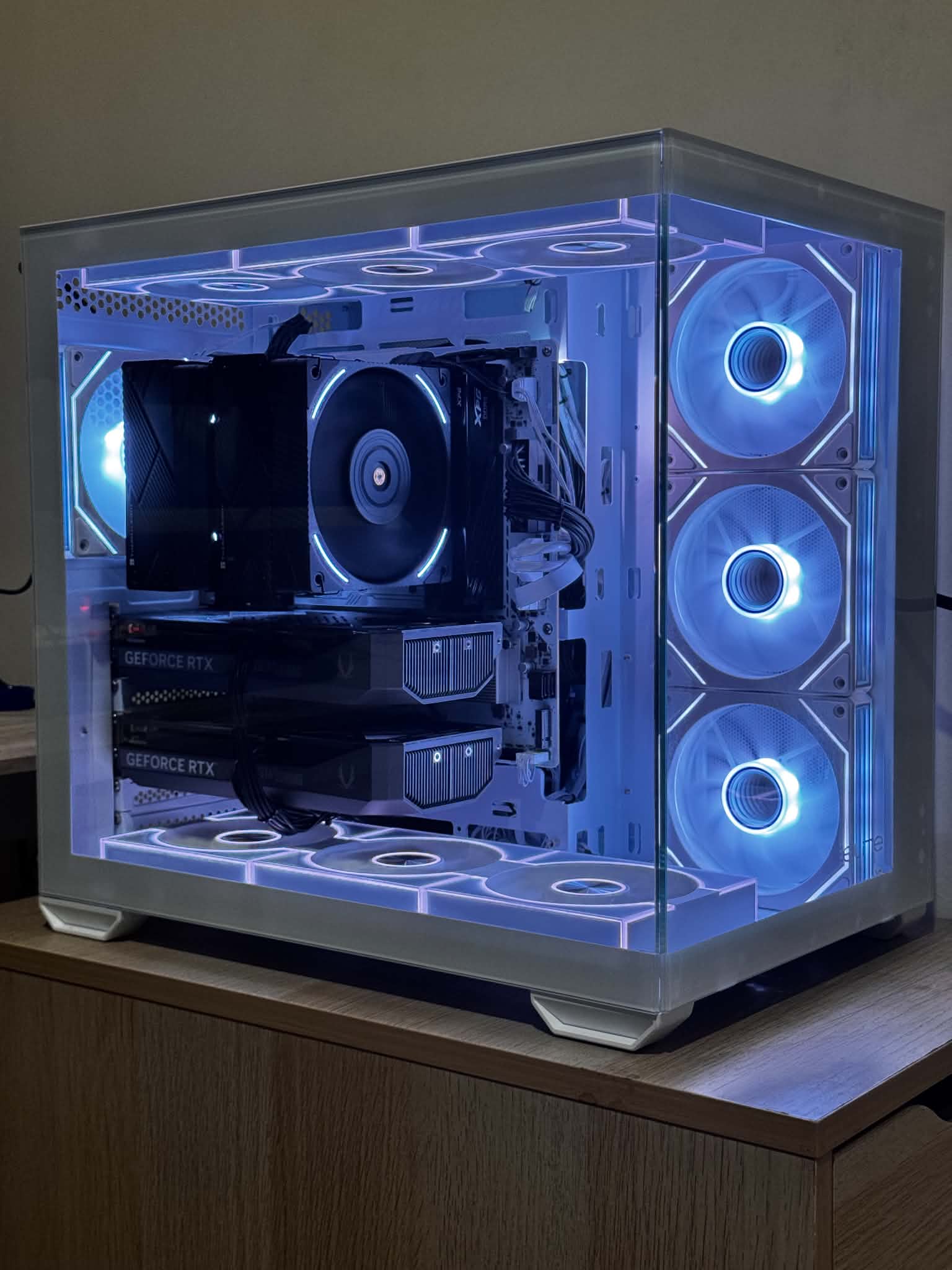
Two cards sitting one above the other: that's the whole point of this build.
| Part | What I picked |
|---|---|
| CPU | Intel Core i7-14700F |
| CPU cooler | Thermalright Phantom Spirit 120 EVO (air) |
| Motherboard | ASRock B760M Pro RS WiFi (DDR5) |
| RAM | 64GB DDR5 XPG 5600MHz (32GB x 2) |
| GPU | 2x RTX 5060 Ti 16GB (32GB VRAM total) |
| Storage | 1TB SSD |
| PSU | Cooler Master X Silent Max Platinum 1300W, ATX 3.1, fully modular |
Why two 5060 Ti instead of one bigger card
The question I kept coming back to while shopping was "does the model fit in VRAM", because once a model spills into system RAM the throughput falls off a cliff no matter how fast the rest of the machine is. So my goal was simple: the most VRAM I could get for sane money.
And the money is the whole story here. A single RTX 5090 was going for over 80 million IDR at Harco Mangga Dua here in Jakarta when I was looking 😂. At that price I stopped asking "which card is faster" and started asking "how much VRAM can I get without losing my mind". Two 16GB cards gave me 32GB to split a model across, at a price I was actually willing to pay.
I know the tradeoff is real: two mid cards are not the same as one card with 32GB on it, since layers split across the pair have to talk over PCIe. But for the sizes I care about, the VRAM headroom mattered to me more than the interconnect penalty.
Most of the rest is deliberately boring. The CPU mostly needs to feed the cards and stay out of the way, and the F variant skips the integrated graphics I was never going to use. The 64GB of DDR5 is about comfort rather than inference: loading and converting weights, keeping ComfyUI around, and doing normal work at the same time.
For the CPU I went with a big air tower, the Thermalright Phantom Spirit 120 EVO, the black slab sitting above the cards in the photo. It's more cooler than this CPU needs when the GPUs are doing the work, but I'd rather over-cool quietly than listen to a small fan trying its best, and on a machine I leave under load for long stretches I like that an air tower is one fewer thing that can leak or fail.
The two parts I'd point at are the board and the power supply, for opposite reasons.
The B760M Pro RS is a budget micro-ATX board, and it's where the compromise in my build lives. It takes both cards, but only the primary slot gets the CPU's full-width link — the second card sits on the narrower chipset-fed slot. That has cost me less than I feared, since the model spends most of its time computing rather than shuffling data between cards, but it's the one line in the table I'd change. More on that at the end.
The 1300W Platinum supply is the opposite: far more than my build actually draws. Two 5060 Ti and a 14700F don't come close to that ceiling, so I bought it as headroom rather than necessity, and it leaves me room for whatever goes in next. It's also ATX 3.1 with the 12V-2x6 connector, the revised version of the connector that had a rough introduction on earlier cards, which I wanted on a machine that pulls sustained load for an hour at a time.
If you're planning two cards, they need the space, the slots and the power for two cards, so check all three before the GPUs arrive rather than after. I'd plan the airflow early too — cards in adjacent slots sit close enough that the top one breathes air the bottom one just warmed up.
From LM Studio to vLLM
Before the numbers, the thing that actually runs them.
I started on LM Studio and I'd tell anyone else to start there too. Install it, pick a model from a list, done. On day one that was exactly what I needed, because the question I was trying to answer was "does this build even work", and I didn't want the answer muddied by a runtime I'd also just met.
I moved to vLLM for one specific reason: NVFP4. The 5060 Ti is a Blackwell card, and that generation has hardware support for FP4, a 4-bit floating point format — a different thing from the 4-bit integer quants most local setups reach for by default. Instead of integers with a scale factor bolted on, NVFP4 keeps a small floating-point representation with fine-grained per-block scaling, which tends to hold up better at the same bit width and maps onto tensor cores built for it. None of that reaches me unless my runtime knows how to use it, and mine didn't. I'd bought silicon with a capability I wasn't touching.
vLLM asked for more in return, since it's a serving engine rather than a desktop app: I configure it, launch it, and talk to it over an API instead of a window. But that shape turned out to fit everything else I was doing. It exposes an OpenAI-compatible endpoint, and an OpenAI-compatible endpoint is precisely what a harness can be pointed at. The model swap I described earlier isn't a clever trick, it's just what fell out of running a real server on my own machine.
I'm glad I went in that order: LM Studio first to prove the hardware, vLLM second once I had a concrete reason. Had I started at vLLM, I'd have been debugging my build and my serving stack at the same time, which sounds like a bad evening.
The models, and what they actually run at
| Model | Quant | Runtime | Tokens/sec |
|---|---|---|---|
| Ornith | Q4 | LM Studio | ~100 |
| Qwen 27B | NVFP4 | vLLM | 22-40 |
| Qwen 35B A3B | NVFP4 | vLLM | ~70 |
One note before reading it: I don't think the first row is comparable to the other two. Different model, different quantization, different runtime. I'm including it because it says something about what this machine can do, not because it ranks against the others.
Ornith Q4 at ~100 tps is the fast lane. Small enough to sit comfortably in VRAM at 4-bit, and genuinely pleasant to use interactively.
Qwen 27B at 22-40 tps has the widest spread here, which is the honest part: short prompts with a small context sit at the top of the range, long context and long generations drift toward the bottom. Still faster than I read, so it never feels like waiting.
Qwen 35B A3B at ~70 tps surprised me most. It's the larger of the two, yet it runs roughly three times faster than the dense 27B — and that's the comparison I'd actually stand behind, because it's the clean one. Same runtime, same quantization, same machine, same day, with only the shape of the model changing. It's mixture-of-experts working exactly as advertised: total parameters decide how much VRAM I need to hold it, but only a small slice is active per token, so speed tracks the active size instead of the total.
That changed the question I ask myself when sizing things up. It's not only "how big a model can I fit", it's "what shape of model can I fit" — total parameters buy capability, active parameters cost speed, and they aren't the same number anymore.
Image and video
The same box does image and video through ComfyUI, which runs its own stack alongside vLLM rather than through it.
- Z-Image for image generation, on the turbo variant.
- qwen-image-edit for editing images I already have, also turbo, and the one I reach for more often. Describing a change to an existing image fits how I work much better than generating from scratch and hoping.
- LTX 2.3 at Q3 for video. This is where my build gets humbled: a heavy quant is the price of admission at 16GB per card, and I can feel it. Good enough for short clips and experiments, and I treat it as exactly that.
| Task | Time |
|---|---|
| Image generation | 7-9 seconds |
| Image edit | 27-56 seconds |
| Video, 5 second clip | ~1 minute |
Seven to nine seconds is the number that changed how I work. It's fast enough that I can look, adjust the prompt and go again without losing my train of thought. Editing is slower and more variable, which tracks with it being the more involved operation, and a minute for five seconds of video is too long for me to sit and watch but short enough to queue up and come back to.
This is also where I think local hardware pays for itself fastest, because the workflow is iteration. I rarely get what I want on the first generation, and at 8 seconds a go, twenty attempts costs me under three minutes.
Thermals
I expected heat to be the problem with two cards stacked like that. It hasn't been.
| State | GPU temp |
|---|---|
| Idle | 27-30°C |
| Chatting with Qwen / Ornith | 40-55°C |
| Image generation and editing | 40-65°C |
| Video generation with LTX | up to 73°C |
What I take from this is that the shape of each load matters more than how demanding it sounds. Chatting barely warms the cards because it's bursty: they work while tokens stream, then sit idle while I read the answer and type the next thing, so there's recovery time built into the interaction. Diffusion and video are the opposite, a sustained load with nothing to break it up, which is why LTX is the hardest thing I run and 73°C is the honest peak — still comfortably short of where these cards start pulling back.
I read those numbers as the payoff for taking the case and its fans seriously, not as evidence that stacking two cards is free. Put the same GPUs in a cramped case and I doubt this section would read the same way.
Hermes, Telegram, and what I actually use it for
The setup I'm happiest with isn't a model at all, it's the plumbing. I installed Hermes Agent on the machine and connected it to Telegram, so the PC at home is reachable from my phone through an app I already have open, with no extra app to install and no VPN dance to get back in. That turned out to be the difference between "a machine I use when I sit down at it" and "a machine I use".
Behind it I run Qwen 27B as the local daily driver, even though it's the slowest of the three. Speed stops being the deciding factor once everything is fast enough, and for tool use I'd rather have the model that follows instructions more reliably. It handles:
- Testing MCP. Wiring up MCP servers and seeing how a local model copes with the tools. It doubles as rehearsal for the outage case: if I want the fallback to work under pressure, the tool wiring has to already be proven.
- Summarizing news. Boring, and the single most useful thing on the list.
- Creating and editing images, and generating video, from the same chat thread.
- Coding, when Claude is unavailable. Same harness, different model behind it.
The local model building the local setup
The thing that convinced me a 27B at home is genuinely useful rather than a fun demo: I pointed Hermes at Qwen 27B and asked it to write ComfyUI skill files, Python and all. It worked pretty well.
I like that for two reasons. I count it as a fair test, because code written against a specific API either runs and does the thing or it doesn't, and plenty of the tasks I throw at a smaller model let it look better than it is. And I like the shape of it — my machine extending its own capabilities, using a model it hosts, to write the glue that drives the image and video models it also hosts, with nothing leaving the house.
Would I build it again
Yes, with the same reasoning and mostly the same parts.
The one thing I'd change is the motherboard. The B760M did its job and kept the budget where I wanted it, but only one card gets a full-width link to the CPU, and that's the obvious bottleneck left in the build. Feeding both slots properly is on the upgrade list.
It's worth being clear about what that upgrade actually buys, though. A Z-series board would let the CPU's lanes split evenly between the two slots, which is a real improvement over what I have now. Genuine x16 to both cards is a different question entirely, because consumer CPUs don't have that many lanes to give — that's a workstation platform, and a workstation budget. So realistically I'm looking at a better split rather than the ideal one, and given how much less this matters than VRAM, that's fine.
If you're considering something similar: total VRAM before anything else, whether the models you care about are MoE or dense, how you'll reach the machine when you're not in front of it, and whether your workflow lives in a harness you can repoint at a different model. The last two are easy to skip, and they're the ones that decided how much I actually use the thing.
The benchmark numbers ended up being the least interesting part. Tokens per second only decide whether the machine is pleasant to use. What makes it worth building is that the work stays on hardware I own, and when someone else's service has a bad day, mine doesn't have to.
Thanks for reading! If you end up building one, I'd love to hear what you put in it 👋🏻
Antony Budianto